One Week with Meta Raybans: Audio and Camera Insights

Original Purchase Date: October 3, 2024 (used for one week as of this writing)

Originally posted: Have a Cup of T(ech) Site

One week of use is not enough to determine if these glasses live up to the hype, but I have racked up a solid list of what I like about them, and where they can also be frustrating. The glasses are great headphones, first and foremost. Wearing headphones that I don’t have to think about (like putting in airpods) means I listen to more music, more podcasts, and even more audiobooks. I find myself listening to Instagram Reels with the sound on now, where before I just watched in silence.

The camera is also proving to live up to my expectations. Taking pics and videos without touching my phone is a BIG DEAL. Keeping me in the moment, while still capturing a snapshot in time. I’ve also experimented with 1st person video for my cocktail club, the Runaway Anchor, and that works nicely. On the “half empty” side of things, the transition lens is not as dark as I had hoped, leading me to still switch to old fashioned shades when it’s really bright, and the AI assistant has been spotty (though I haven’t used it that much…yet). At the moment I am very happy with my purchase, but only time will tell if these truly become part of my day-to-day life, or if they end up just being another piece of tech I use from time to time. And if they only end up being headphones, I’m not sure that’s a total win.

I own several pairs of very nice headphones (including Airpod Max) and I can confidently say that these glasses are my new favorite headphones. If kept at 50% volume, people around you cannot hear what you are listening to, and when you crank up the volume full blast, you can enjoy music and podcasts while mowing the lawn (tested last weekend). The quality of the sound is certainly not on par with the big “over-ear headphones”, but that’s not the point with the Meta Raybans. The point here is all about access. How easy is it to just hop in and out of your audio content. I no longer have to put Airpods in and out all the time, or look for where I put my Airpod Max headphones. With the Meta Raybans, I am always wearing my headphones, while at the same time, I’m kind of never wearing my headphones. It’s trippy, and unlike much of the technology changes over the past 5 years, it’s kind of life altering. I interact with audio on a different level now. I sneak little snippets of music and podcasts all the time, where before I would have to dedicate time for listening to audio sources. I also listen to audio in Instagram Reels and News stories because accessing the audio is just a tap away, and I never did that before these glasses.

The audio is turned on and off with a single tap on the right side. Sorry all you left-handers out there, this is a right-handed device for now (sigh). Two taps will advance the track for music and three taps will go back a track. Touch and slide forward to increase volume. Touch and slide backwards to decrease the volume. That’s it. Whatever audio source you are using on your phone will be controlled by tapping. Switching between things like podcasts, audible and music is a little clunky at the moment. Spotify support is supposed to get better, and you can have a default service when you ask for music (mine is Apple Music). But you can’t ask for an audiobook on Audible to start right now. That’s also an update that is said to be coming in the near future.

There is also a touch and hold audio feature that will start a designated music source (amazon music, apple music, spotify or calm). I have that set for Spotify, as I have better playlists there (curated by my kiddo). It’s a bit random at the moment, and I use the feature for my “I don’t know what I want to listen to right now” moments. So that’s it for the headphones part.

The camera is what got me to pull the trigger on this purchase. The idea that I could grab pics when I’m doing something fun without the usual “phone fumble” was exciting to me. Think about it. If you see something cool and want a pic, you do this: take out phone, wake it up, open camera app, point camera at thing you want picture of, push the capture button, turn off phone, put phone back in pocket. That’s a lot of steps. And the moment you capture is through a viewfinder (as in your phone screen)! With the Meta Raybans your eye is the camera, and the capture is just a single tap (or a voice command of “Hey Meta take a photo” if your hands are occupied or perhaps in the pic). I even managed to snap a pic of a book I was holding, by pushing shutter and quickly putting the object into the frame (see pic).

The camera is easy to use. Tap the button to take a picture (again, on the right side only!!) Hold the button to take a video (default is 1 minute, but can be increased to 3 minutes in the mobile app). I discovered quickly that if you are wearing a baseball cap the camera will see it, and you get a notification that the “camera is blocked”, but only after you are done shooting the video. So I ended up turning my hat backwards when I use the camera, which isn’t a great look, but it is functional. I don’t do a lot of “out in the world” videos, but I’ve shot a few to show different light impacts on filming (I’ll share those videos in the future, when I deep dive into the cameras). For now, I’m much more interested in the “point and shoot camera” but again, the hat brim will get in the way…

The quality of the video and images is great. Not as good as most current mobile phones, but still great for their intended purpose (quick snaps of what you’re doing, without the need to grab your phone). The audio capture is also great. I’ve made a couple cocktail videos that worked nicely, and I did a recording while singing and playing the piano that turned out nicely too (I will not be sharing that video though!) Time will tell how much I continue to use the camera. It’s worth noting that you can set up the mobile app so when you import images and video from the glasses they will copy into your phone’s photo library too. And if you delete the images in the Meta Mobile app, it will ask if you’d like the library copy deleted too. That is very handy and keeps down the image clutter!
Alright, that’s enough good stuff. What about the bad stuff, right?!? Much like the new iPhones, the AI elements of the Meta Raybans are pretty basic, but promise updates “soon”. The command is “Hey Meta” and then you can ask basic questions. Weather and Timers work great (just don’t use the British voice assistant or you’ll get Celcius for weather). You can “google things” with some success. I was able to ask for the hours at a local restaurant before heading out the door (some day maybe I can get on the wait list with a quick voice command…) But, all in all, the AI is more of a gimmick, than a feature I use often. But I truly haven’t kicked the tires to hard yet, and plan to do that in the weeks ahead. Stay tuned.
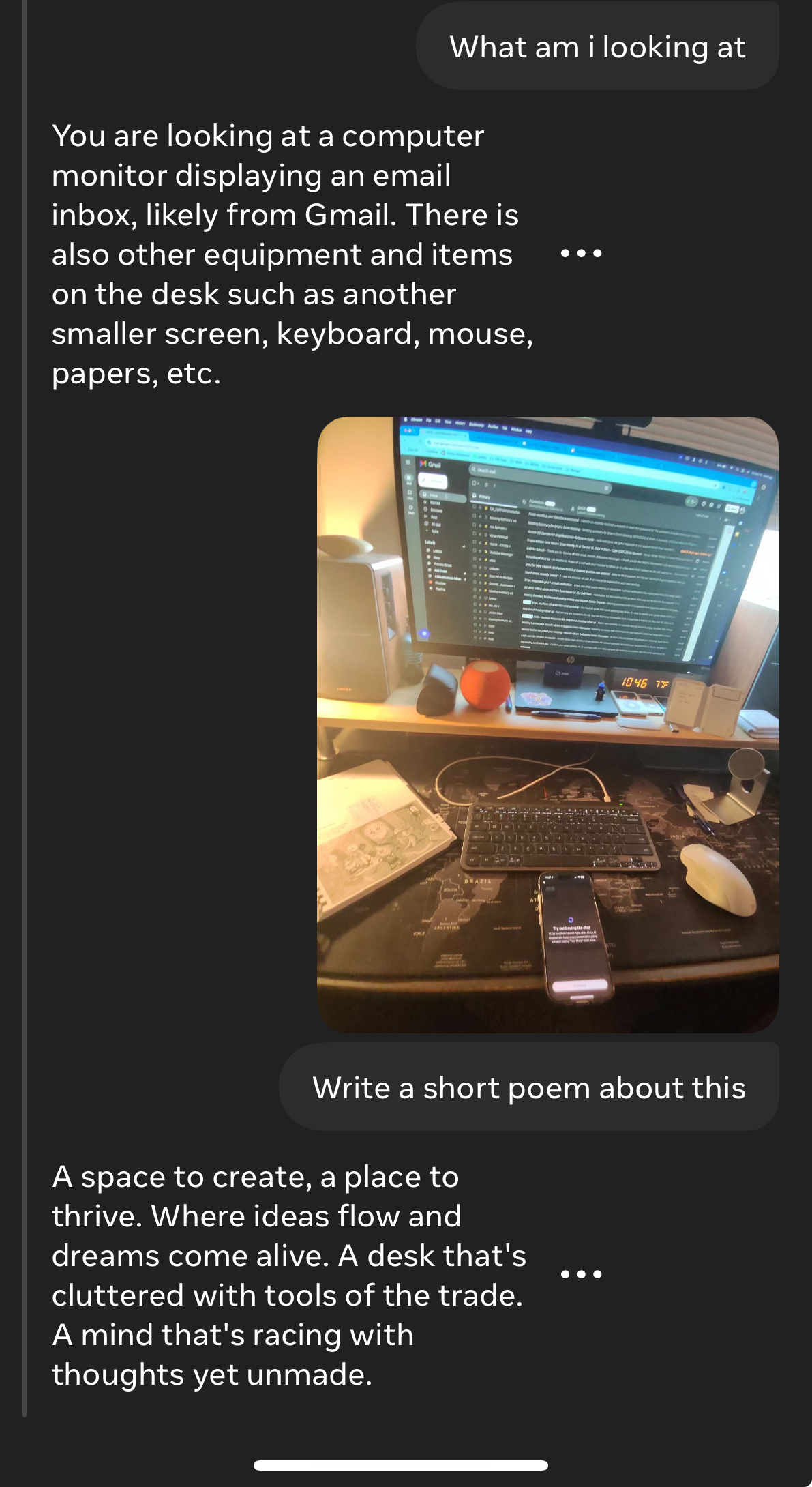
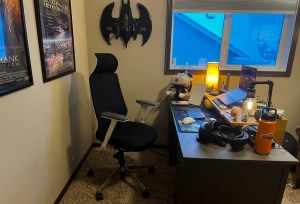
The one AI element that has been most interesting to me is “tell me what I see”. When you ask this you will get a detailed description of what is in front of you. Down to pretty detailed elements. Then you can ask it to write a poem about what you see. Here the pic and poem the glasses came up with when I looked at my home desk. When the features update to include actionable questions, that’s when this tool goes from gimmick to useful. But we are not there quite yet. I am hopeful.

I’m just a little over a week with these Meta Raybans smart glasses, and so far I’m really impressed. A friend of mine, who is a fellow Meta Raybans owner, responded this way when I said I was really enjoying the glasses so far. “I know you’d love them… they are so in line with your tech values”. That is really true. I do not like my smartphone. I do not like staring at screens. I think it’s better when we put our tech aside and just be in the world. But realistically, we are stuck the mobile internet on our person at all times. So any tech that keeps my hands empty and data easily accessible is definitely “in line with my tech values”. And so far, these glasses are doing it. Now I just have to see if my usage is sustainable, and not just the excitement of something new. I’ll be back with more posts in the future, as I examine daily use and dig into specific features in much more depth. Till Next Time…

BC

First Impressions: Quest 3

The Quest 3 has finally arrived! The latest virtual reality headset from Meta has some seriously high expectations, both as a “next generation” device, and for helping Meta compete in the area of Mixed Reality, just as Apple is set to ramp up interest in the space with the Vision Pro early in 2024. So let’s looks quickly at this new VR headset and answer some basic questions with my first impressions.

For those new to my style of reviews, these are not technical reviews, but more consumer reviews. I want anyone who is interested in virtual reality to know what this new headset is, and whether it’s worth dropping $500 to get (versus, you know, getting a PS5 or something). Here we go!

The previous headset, the Quest 2, lived a very long life for an emerging technology at THREE YEARS. For context the original Quest launched in 2019 and lasted one year before the Quest 2 replaced it in October 2020. So the market is now full of Quest 2 hardware, which Meta will continue to sell as an “entry level” device starting at $299. So what do you get for the extra $200? Many things it turns out. But we’ll keep this pretty high level.

New Form Factor – the Quest 3 is a significant change from Quest 2. There is a claimed 40% reduction in size. Simply put, this thing feels way more like ski googles than the Quest 2 ever did. While it weighs roughly the same as the previous generation, the Quest 3 doesn’t feel as heavy because the weight is closer to your head. The lens are changed out for “pancake” style, which means they are thinner, and also they are larger, so you will have an increased field of view when you are in VR. The controllers changed too, ditching the rings that often caused confusion for new users (but did give us a handy way to “hang up” the controllers when not in use.) No more rings. The controllers are still tracked by the headset though, so no putting your arms behind your back (like you can with Quest Pro, which features self tracking controllers). So, big change in the physical headset that is VERY noticable visually and also when you wear it.

Software Updates – the headset is run by a much faster computer chip, which means games launch faster, and the headset can support higher quality graphics. Many game makers are already upgrading the graphics of their content libraries (including my fav, Walkabout Minigolf). The user interface is the same as Quest 2, so there isn’t a whole new ecosystem to learn thankfully.

Color Passthrough – I’m giving this topic it’s own section because for many it will be a huge selling point. And for Meta to compete in the Mixed Reality space, this feature needs to hit with consumers. On Quest 2 the passthrough camera revealed a grainy grey world when enabled. The passthrough wasn’t even intended to be functional beyond setting your “guardian space” when the Quest 1 originally launched. But as more folks want to play Mixed Reality games, or build experiences that overlay the physical space with digital experiences, the passthrough became more important to the product development team. The Quest Pro features the first “full color passthrough” but it was still pretty grainy, and without a depth sensor it was still just taking flat videos of your space, and wasn’t great at mapping physical objects (which is crucial for mixed reality).

Notice these pics taken with Quest Pro (left) and Quest 3 (right). The first looks out my office window. The Quest Pro is a blown out light space and requires moving closer to the window to see building and objects. The Quest 3 is clear immediately. The second set of photos is my office desk. You’ll notice the Quest Pro (left) is more washed out and blurry, whereas the Quest 3 (right) has that pop of color. What you can’t see in the picture is that I can read the words on the world map on my desk with Quest 3, where with Quest Pro it’s all white blobs. So the passthrough upgrade is a true game changer for the Quest product line. I look forward to seeing what developers do with it. I’m already using it for Horizon Workrooms and Puzzling Places, and the upgrade is very noticeable.

One more demonstration of this new and improved Passthrough. The following were taken with the headset on my head, both the still image and the video. And it is pretty stunning.


If you have been enjoying the Quest 2 over the past three years and want to continue the experience of the best Mobile VR on the consumer market right now, then upgrading to Quest 3 is a good choice. I have been working in the VR space for almost 8 years, and I rarely experience the rush of the original days when I first strapped on the Gear VR and the HTC Vive, but I can honestly say that the Quest 3 blew my mind. Especially the Mixed Reality Demo that features aliens blasting through your walls and bouncing off your furniture, as you blast them with your ray guns. The experience reminded me of an old demo with the Magic Leap One, but since the passthrough is all video, the experience is seamless in both direct and peripheral vision (AR headsets are famous for their tiny field of view).

At the same time, the Quest 2 will continue to be a very good entry level headset. The vast majority of games will be backwards compatible, at least for a while. So if you aren’t in a rush to drop half a grand on a new headset, you aren’t being left behind. The move from Quest 1 to Quest 2 felt more like “to experience good VR you need to make the change”. The shift to Quest 3, while I’d say it is a more dramatic change this time around, it is at the same time a more tolerable shift, because the Quest 2 remains a very good VR headset, and will be a solid choice for a while into the future.

It’s worth noting that battery life continues to be an issue and there is some concern that by trying to keep things small while increasing the computing power we could see battery life drop. I will be paying attention to that as I use it. Also the stock headstrap, while I’d argue is modestly better than the Quest 2 stock strap, if you’re a regular user you will want to upgrade to an Elite style strap (and wait a month or so for the 3rd party companies, like Kiwi, to release solid solutions).

The Quest 3 is the VR headset the market has been waiting for these past 3 years. The Quest 2 served us well, and will serve as a solid workhorse for years to come, but the landscape of Virtual Reality is changing. The introduction of more Mixed Reality solutions and “Spatial Computing” concepts mean that Meta has to continue to push innovation or be left behind when companies like Apple make their play for the market.

The Quest 3 is an upgrade you feel every time you use it. It’s more like moving from PS3 to PS5, versus iPhone 13 to 15 (both jumps I’ve made myself recently). If you love VR this is a headset to get. Or you can hope you know someone who has one and ask them for a demo. I can pretty much guarantee you’ll have a blast.

More to come on the details as I use this headset over the next few weeks.

Cheers!

BC

My VR Office Experiment: Day 40 (Last Day)

Happy New Year from the physical side of the VR Office!

Final Day in the Virtual Office!

Today marks the end of the VR Office Experiment. Well, at least the end of the period of data gathering. I have been sharing daily stats for the past 40 working days (plus some additional weekend content). Those stats are just the basic numbers. There is more data to be mined out of the tools I have been using to track my productivity in VR. But not till next year. For today I will wrap up with the final Week Stats, and share one last chart as a teaser to the next phase.

For me, this a huge day. Writing posts almost every day for two months was daunting at times. But I made it through without a miss, and made some fun videos along the way! So I am very happy to cross this milestone from data gathering to data analysis. And I’m glad to be done with daily posts for at least a few weeks, as I take some time off for the holidays.

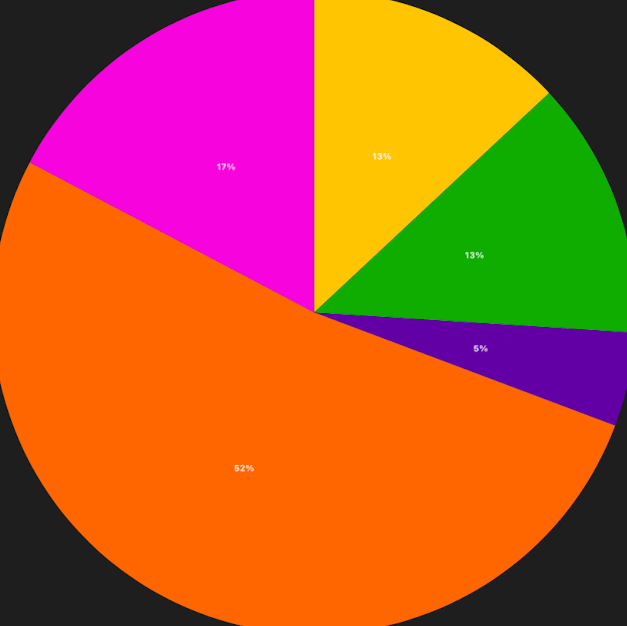
Here are the stats for Week 8 in the VR Office:

Total Time in VR: 11 hours and 30 minutes (across 22 sessions)

Focus Work: 52% – 5 hours and 58 minutes (across 10 sessions)

Community Time: 17% – 1 hour and 59 minutes (across 2 sessions)

MiniMindfulness: 13% – 1 hour and 30 minutes (across 4 sessions)

1:1 Meetings: 13% – 1 hour and 29 minutes (across 3 sessions)

Team Meetings: 5% – 32 minutes (across 3 sessions)

Summing it all up (too long for #TLDR)

I saw a dip in the number this final week mainly due to this being a short week with lots of Zoom calls to wrap up the year. But like I’ve said so many times over the past month, that is OKAY. The number are what they are.

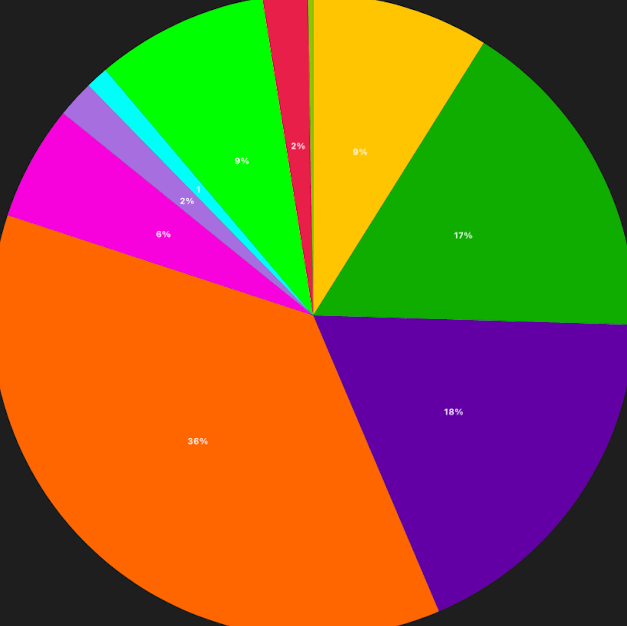
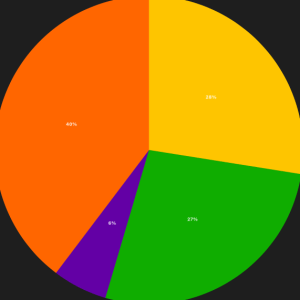
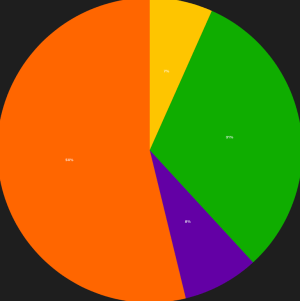
I started this effort as a personal exercise, because I wasn’t finding enough data from people who didn’t enter the VR Office with a bias (both for and against it). My work tracking my usage in VR quickly turned into something that had value for my company, OssoVR. As a remote company, these VR Office tools could be very valuable. But they could also be a distraction, and a waste of time and money. We need to understand how these tools work in order to know where they add value. I’ve done my best to to honest all along the way. I chose to share the journey online through this blog and LinkedIn posts, and the response has been pretty cool. Over 400 people have followed these posts across 20 countries! Thank you to everyone who has chosen to read these daily journal entries. I’ll be back in January 2023 to share more about my findings. My end game is a detailed report articulating “The Value of VR for Workplace Productivity“. But more on that to come. I’ll leave you with a final pie chart. This represents my 40 day VR Office Experiment. I’ll talk numbers in January, but just know that I spent over half of my working hours in VR during this experiment, and Focus Work, Team Meetings, and 1:1 Meetings were the biggest slices. And that gives us a clear path forward.

40 Working Days in Virtual Reality

See you in 2023!

BC (another AI Avatar)

My VR Office Experiment: Day 39

Holiday Partner Success Community Time!!

Day 39 in the Virtual Office!

Total Time in VR: 2 hours and 33 minutes (across 5 VR sessions)

Use Cases: Community Time (39% – 59 min), Focus Work (32% – 49 min), 1:1 Meetings (19% – 29 min), MiniMindfulness (10% – 15 min)

This is the last working day of the year, and to some degree that last day of the VR Office Experiment. I am going to write up the Week 8 Wrap Up tomorrow before the Holiday Break truly begins, but my professional work is done for 2022! What a wild ride these past two months have been in the VR Office. And today ended on a solid footing, being that the typical “downshift” before break was in full effect.

A nice mixture of focus, 1:1, and community time today is a perfect end to my week and the experiment. I am so excited to see what the data says about the viability of VR for Productivity. I am confident it is viable. But for what? How much time? These questions will find answers in 2023.

Cup Half Empty: Nothing empty to report today. I did try and join my manager in Eleven Table Tennis but the collab was not working (which is par for the course with that game. A game I’ve loved since playing on tethered Rift and Vive Pro). We ended up in his “Horizon Home” which was my first time seeing the meta avatar in the Home, and that was pretty cool.

Cup Half Full: Hosted Community time with my department and we had a blast. Such hijinks with a bunch of people who are all over the country (and Canada). We’ve all been together in the real world a couple times, but you’d think it was much more when you experience the team having fun together.

Also wrapped the year for MiniMindfulness and had one of my favorite new memories. We climbed the big tree in Original Gothic Hard, and one of the meditators didn’t like the stability offered by the branch they were on. So I moved locations and offered my branch. What a weird experience. A cool experience. I hope to have many more with MiniMindfulness 2.0 in 2023!

#TLDR

A good final working day. VR makes my work better. VR makes my life better. But I’m an early adopter. I’m a beta tester. Let’s just say it, I drank the VR kool-aid a long time ago. But I’ve done a good job (I think) of keeping my focus on proving out the use case here. I’ve had bad days. I’ve had “let’s just do zoom” days. I’ve been honest when things fail. And I have never fudged the numbers just to make VR for Productivity look viable. The data is just waiting to be un-wrapped. But I’ll wait a bit and let it settle before digging in. One last post for the VR Office Experiment to come. So for the last time for a bit I say,

Till Tomorrow…

Just a Snowman in a Graveyard… nothing to see here.

My VR Office Experiment: Day 38

Day 38 in the Virtual Office!

Total Time in VR: 4 hours and 40 minutes (across 7 VR sessions)

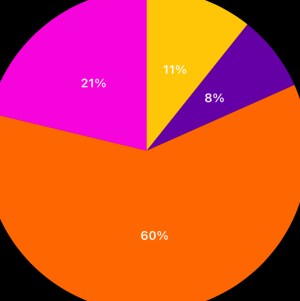
Use Cases: Focus Work (60% – 2 hour 49 min), Community Time (21% – 59 min), MiniMindfulness (11% – 30 min), Team Meetings (8% – 21 min)

A solid day today. Lots of focus work, as I keep tying out my projects before breaking for the holiday. I hosted a holiday community time (cover photo today), and that was a lot of fun. New update today there, so we had some glitches that were pretty annoying, but we also had some fun with it. Nothing funnier than acting like the person who keeps vanishing has vanished, even when he hasn’t!!! “Oh no, looks like he vanished again…” (hehehe)

Cup Half Empty: We had a more successful stand up today, but still one person was having issues. Could only see our names, not our avatars. And though we could see her, the avatar mouth was not moving, so that was a little odd. Step in the right direction, but still a “half empty” moment.

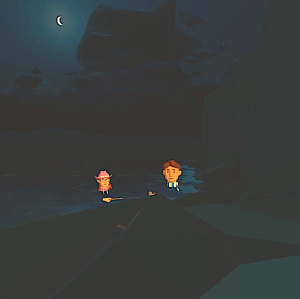
Cup Half Full: The Mindfulness crew sailed off over the Quixote Valley Sea to a new location this morning. I really like the idea of “traveling” to our meditation spot. That means the people joining must have good “VR Legs” to handle the flying part, but the action of flying off as a “fellowship” of sorts to our remote location is kind of amazing. Thank you to the devs at Mighty Coconut, for leaving the courses truly “open world”. Don’t put up walls!! And we excited to start meditating in Atlantis in 2023!

Our new spot on Quixote Valley

#TLDR

While a 40 day Experiment, tomorrow is my last working day of 2022. So tomorrow is the last day of tracked data. I have a bunch of things already on the VR calendar, so it should be a good day. I keep poking at the data analytics tools and I’m thrilled with the amount of information at my fingertips. Just need to be patient, cuz the data crunching is a 2023 thing (I am taking some welcome vacation, and showing NYC to my kiddo!)

Till Tomorrow…

BC

My VR Office Experiment: Day 37

Lobby Dark – My Evening Office (where I write these posts)

Day 37 in the Virtual Office!

Total Time in VR: 2 hours and 26 minutes (across 5 VR sessions)

Use Cases: Focus Work (66% – 1 hour 36 min), 1:1 Meetings (20% – 30 min), MiniMindfulness (10% – 15 min), Team Meetings (3% – 5 min)

Another slower day, but again life keeps getting in the way. Pre-blizzard prep today pulled me away a bit, and a field trip to “field test” a VR functionality. So again most of my time was Focus Work, as I wrap up things for the year.

Cup Half Empty: My first VR meeting was Stand Up and the avatar issues persisted again (thus 5 minutes and we gave up). I had a 1:1 later in the day and we didn’t have any issues with avatars, so I’m becoming suspicious it might be headset related (read WIFI related) not a systemic problem. This goes to the point that any issue that comes up in VR could be one of a bunch of root causes, and it is important to keep the options open as you move to discover the true root cause of a failure. Gotta have that engineering hat on!

Cup Half Full: I did have a great 1:1 meeting with a co-worker. We got to chat about our upcoming visit to New York City and then get into some work I’ve been doing with my team. Good balance between our social and working relationship. This is so important at a remote company. It can’t just be about the work. There are just so many things we take for granted when we work in a physical office. So many little gestures, blink and you’ll miss it interactions that are harder to simulate in the remote setting. Zoom can’t cut it. VR might have answers. I strongly suspect it does, but that’s getting ahead of the data.

#TLDR

Still a shaky last week, but life will always be a factor in how the day rolls out. And the crush of the end of the year, prep for a long holiday, and a family trip are the perfect storm for the experiment not being as active as previous weeks. The Christmas Blizzard hits tomorrow, so should give me good reasons to stay inside and in VR as much as possible. Plus I’m hosting a Holiday Gathering on the Walkabout Minigolf Course in the morning for Community Time!

Till Tomorrow…

BC

My VR Office Experiment: Day 36

A New VR Environment for Horizon Home

Day 36 in the Virtual Office – the final week begins

Total Time in VR: 1 hours and 49 minutes (across 5 VR sessions)

Use Cases: Focus Work (40% – 43 min), MiniMindfulness (28% – 30 min), 1:1 Meetings (27% – 29 min), Team Meetings (6% – 6 min)

It is becoming a theme with Mondays… Another slow start to the week. I won’t blame the VR experience for most of it though I have one item for “cup half empty” to discuss. Life just got in the way today. This Monday in particular was challenging as I had lots of stuff on my list, including a mid-day trip outside the house (in a snowstorm), and it’s the beginning of a 4 day week leading to holiday break. So not the start I wanted for the beginning of the final week of the VR Office Experiment.

Cup Half Empty: The most interesting stat today is 6 minutes of Team Meetings. That was an attempt to have a Project Meeting (standard Monday meeting) in Workrooms. Today the avatars were not working right. At one point we couldn’t see each other. The person joining on WebPortal could only see the “shadow avatar” that appears when someone is offline. There was even a latency issue, which I haven’t experienced since the earlier days of this platform. Just seems like the 1.9 update has some bugs. It was a “major” update, so bugs are to be expected. Hopefully they are squashed soon.

Cup Half Full: The full crew of three returned to the mindful minigolf courses today. One of our crew was on vacation last week. I shot this short video of our space this morning, which will be a part of an upcoming review of “Walkabout Minigolf for Team Building”.

MiniMindfulness on the El Dorado golf course

#TLDR

Another rough beginning. That doesn’t always mean a bad week. I want to end strong, so hopefully tomorrow will be a return to form. I am starting to see the trends, the solid use cases, the bad use cases, and what expectations we might place on workers in the VR Campus. Time to prove this space works, even after a tough Monday.

Till Tomorrow…

New AI created Author Avatar (kinda epic..)

My VR Office Experiment: Week 7 Wrap Up

Week 7 – December 12th – December 16th

Total Time: 17 hours and 25 minutes across 25 sessions in 4 categories.

Focus Time-46% (8 hrs 2 min – 10 sessions) slight drop from 50% last week

Team Meetings-25% (4 hrs 25 min – 5 sessions) roughly the same from 21% last week

1:1 Meetings-22% (3 hrs 52 min – 6 sessions) big increase from 9% last week

MiniMindfulness-6% (1 hrs and 5 min – 4 sessions) big drop from 11% last week

Observations of Week 7 – This was a roller coaster of a week. I started with really low numbers, partly because of my schedule and partly because of illness. But then I worried that I would get stuck down there. I didn’t need to worry because I came roaring back for the last half of the week! Workrooms received an update this week that added more stable monitors, fist bumps, and floor passthrough! At work it also added the need to update which can be challenging with large groups who don’t use the platform nearly as often as I do. But we are working through those challenges.

I’m excited to draw the VR Office Experiment to a close next week. Not because I don’t want to keep using VR for Productivity (far from it!!), but because I am itching to start looking at the data. I even looked a little this week and stopped myself. I don’t want any numbers introducing bias, because I want my conclusions to be as balanced as possible. One more week of daily posts and then a break for a while, as I crunch all the numbers. More on the plan just before the holiday break. Time to finish strong!

Till Tomorrow…

BC

My VR Office Experiment: Day 35

A little fun at the end of another onboarding session!

Day 35 in the Virtual Office!

Total Time in VR: 3 hours and 8 minutes (across 4 VR sessions)

Use Cases: Team Meetings (64% – 2 hours), Focus Work (28% – 53min), MiniMindfulness (8% – 15min)

A solid finish to a week that started out so shaky! I started the day with a co-worker in MiniMindfulness (sitting on top of the Caddyshack watching the sun rise/set). After a few Zoom calls I helped with a new hire onboarding (see today’s title pic) and finished the day in Focus. Friday’s are often wild cards with my schedule, but today brought my overall weekly number a little higher than last week, so that’s a good trend going into the eighth and final week next Monday.

Cup Half Empty: I noticed the return of the phantom mouse cursor again today. But my laptop was being very weird in general, so I did a restart (good idea to restart your computer every once in a while anyway), and after that the cursor was back to normal. Just reminds me that laptops have strange issues all the time. Just because the virtual monitors are being weird, doesn’t mean it’s the VR program at the root cause, as it might just be the ole laptop itself.

Cup Half Full: I haven’t done an onboarding for a while, and so that was a great end to my week. I also noticed that the update earlier this week DID add something new. FLOOR PASSTHROUGH! I only noticed when I went up to the whiteboard (I’m generally a desktop whiteboard guy). Once standing at the whiteboard I noticed when I looked down I could see my actual floor. And I glanced at the corner of my desk through the passthrough and said “I’m never slamming my leg into you again!!” A very smart improvement to Horizon Workrooms.

#TLDR

This was a roller coaster of a week. Started so bad. I started questioning the validity of the whole thing. But then I bounced back. I think it is a very good thing that I hit that wall, even if only briefly. That’s a real wall that many will encounter as this technology finds an audience and the scaling begins. How to bounce back as quickly as I did is the puzzle that needs to be solved on a large scale. I’m working on a new video, and I hope to post it before I break for the holiday next Friday, December 23rd, which is also when this VR Office Experiment comes to a close. But the experiment was only the beginning because the next phase is DATA ANALYSIS, which geeks like me enjoy a little too much. But one more week of data to gather. Hoping to end with the same strength I started with way back in October.

Till Next Week…

BC

My VR Office Experiment: Day 34

Day 34 in the Virtual Office

Total Time in VR: 4 hours and 59 minutes (across 7 VR sessions)

Use Cases: Focus Work (54% – 2 hours 41 min), 1:1 Meetings (31% – 1 hour 34 min), Team Meetings (8% – 24 min), MiniMindfulness (7% – 20 min)

Take a look at that mountain in the distance of my cover photo today. I look at that mountain all day long. I actually arrange my screens so that I have an unobstructed view out that window. Today I really noticed how working in the Lakes Office gives me the illusion of working in a much larger room (with some nice views, albeit cartoon-y). That’s one of the things I think I’ve been taking for granted. I have been so focused on how going to the Lakes Office makes it feel like I’m “leaving my house”, but it also makes it feel like I’m in a different sized space. Here is my home office setup. You can see I’m very much backed into a corner (mainly because I don’t like facing the wall when I’m not in VR). But in VR I have space all around me. It’s good for my head, and I look forward to more virtual worlds to set my virtual desk inside and work.

Home Office Setup (complete with Lego Batwing on the wall!)
VR Office 360 Video
Moving in and out of the VR Office

Cup Half Empty: Workrooms access continues to be a challenge. I’ve had a few folks find success by un-installing and re-installing. Another was having issues, then did the update successfully and issues went away. It’s just been inconsistent, which is challenging with new tech and a semi-skeptical audience. The people at my company, OssoVR, deeply believe in the value of Virtual Reality, but the scope is tied to Medical Education and Surgical Training. Even for these true believers, the idea of working all day long (or 50%) in VR seems un-realistic. That’s one of the goals of this experiment, to understand what is realistic. And fighting with Workrooms access and updates is only making my job more challenging this week.

Cup Half Full: After the last update the screens seem more stable. They also pop up much quicker. I was hoping the update would finally bring virtual monitors to PC users, as that is a huge area of interest, and I’m one of the few Mac users at my company. Fingers crossed that feature comes soon.

It was another super productive day in VR. Met with my boss in Workrooms to go over some documents. Hosted several other meetings in VR and it is always better than Zoom (of which I did a bunch of today as well, as always). I started in MiniMindfulness alone today, and took the opportunity to find a new spot that fit one person. Here’s a shot from my hidden location on the El Dorado course.

#TLDR

The numbers stay strong on Day 34, and not because I’m trying to fudge the numbers up; I’m actually just having more time to spend in VR and I have lots of focus work to do before the end of the year. We wrap up Week 7 (of 8) tomorrow. I always think Friday’s will be slow, but last week was a full rich VR day, so….

Till Tomorrow…

BC