My VR Office Experiment: Day 6

Day 6 in the Virtual Office! Happy Halloween!!

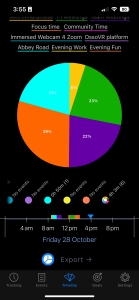
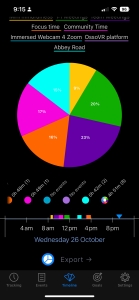
Total Time in VR: 4 hours and 45 minutes (across 8 VR sessions)

Use Cases: Focus Time, Team Meetings, 1:1 Meetings, Mini-Mindfulness, Abbey Road, Evening Work

Week 2 has begun in the VR Office! The day started out a little rough. One of my first meetings was in the VR platform “Immersed“. Between my computer failing to map and my co-worker unable to enter my VR room, we gave up and went to Workrooms, which remains quite reliable. This week is all about maintaining momentum, and getting through the honeymoon period in the VR Office. Fingers crossed!

Cup Half Empty:

During the morning I was working in Excel, doing some data analysis. I found the screen harder to read today. I was trying to figure out if my struggles with the spreadsheet where related to the VR screens, or just my foggy attempts at remembering excel formulas I haven’t used in years. This is a good reminder that I need to always be conscious of when the technology is getting in the way of me doing my work, just like the example with the Immersed platform I mentioned earlier. The goal of this experiment is to figure out if you can be productive in VR. And when the tech fails, I can’t spend a bunch of time figuring it out. That type of work needs to be done in the evening, off hours.

Cup Half Full:

I have a new headstrap! This new model has a larger battery on the back and returns balance to my Quest 2. Time will tell if it is a solid choice, but my first impressions are good. I particularly like the color indicator on the dial that indicates battery life.

After fighting with excel in the morning, I had a great session with my team in VR today doing data analysis. The power of three people sitting around a table and working through a problem together can’t be understated. The idea of having that same meeting via video chat on Zoom sounds terrible to me. This is a great example of Virtual Reality bringing an added benefit to remote workers.

#TLDR

After a couple hiccups in the morning, the VR Office Experiment is back in full swing. My desk setup continues to improve, now including a full size mouse pad for comfort on the wrists and perhaps better tracking from the headset. More of my day was in solo work today, but this week has some exciting collaborative sessions in store! Here we go!

Happy Halloween!!

Till Tomorrow…
BC

My VR Office Experiment: Day 5

Day 5 in the Virtual Office!

Total Time in VR: 4 hours and 3 minutes. (across 6 VR sessions)

Use Cases: Focus Time (1h 10m), 1:1 Meetings (56m), Team Meetings (53m), Abbey Road (50m), Mini-Mindfulness (12m)

Woo! Wrapping up Week 1 of this VR Office Experiment! I am pretty excited about this first week! Today was my shortest of the week, but I also had several team members out of office and not as busy of a calendar. Used Focus Time to wrap up my tasks, and Abbey Road to do some “VR WeWork” this morning. A good end to a good week in the metaverse.

Cup Half Empty: The theme of the week was “keyboard not tracking well” and that continued today. Even the AR overlay in desktop passthrough is struggling with mapping over the keyboard. Since I’m on Quest 2, that means the passthrough is still quite grainy and I have to lean down really close to see the keyboard. Thankfully I’m old enough to remember typing on a word processor and I had a rigid teacher in typing class, so I don’t need to look down very often! I might switch to the Apple Magic Keyboard next week, as I’ve used my Macbook almost exclusively this week, so toggling between computers is less important.

On a different note, I had the problem of my Elite Headstrap with Battery cracking late last night, so I’ve been using a Kiwi head strap. While a nice design (especially with the hinge), I immediately noticed the lack of weight on the back of the head. All day today has felt different and a little uncomfortable. Plus without the extra battery, I’ve been plugged into the wall often while in VR, which isn’t ideal. I ordered a new head strap that arrives over the weekend, so hopefully this issue is resolved next week. I’m trying a new design as I have now broken THREE Elite head straps from Meta. Stay tuned.

Cup Half Full: This morning I was involved in a 3 way convo on Slack about an issue. Shortly into the convo all three participants ended up in Workrooms for a different meeting. It was notable to me how different the interaction was in VR. That shouldn’t be a surprise, in VR we are actually present in the same room. But the difference was the convo, which was still work related, had HUMOR. There was joshing around. There was laughter. There was “physical comedy” which our limited half bodies. That was the start of my Friday and I really enjoyed it.

#TLDR

I set out do 4 hours a day, and I exceeded that by a fair amount (spoiler alert for my upcoming “weekly review”, my total was 29 hours and 24 minutes, or roughly 5.8 hours a day). Today, though a quieter day in VR, I still hit the 50% mark. I am finding it remarkable how easy it is to move in and out of VR, and how productive I feel when I’m in here. I know this might just be “first week sizzle”, so I’m looking forward to Week 2!!

Till Monday…

BC

My VR Office Experiment: Day 4

Day 4 in the Virtual Office, on the road!!!

Total Time in VR: 4 hours and 12 minutes. (across 7 VR sessions)

Use Cases: Focus Time (2h and 8m), 1:1 Meetings (1h, 8m), Community Time (34m), Mini-Mindfulness (20m)

I spent my day at a friend’s office, as I do once a week to get out of my home office where I’ve worked for three years now. I hope in the future to get more minimalistic with my gear, but today I had a lot of stuff in my bag to setup my configuration in a different place. But I’m doing this again in a week so maybe I’ll be optimizing quickly.

Cup Half Empty: I continue to have issues with the keyboards in Workrooms. I have an Apple Magic Keyboard and Logi MX Keys Mini Keyboard. I generally use the Logi because I can toggle between Mac and PC easily. But the keyboard tends to float over the table and vanishes when my hands aren’t on it. I tried with the Magic Keyboard and it seems to have the same issue. I have a wood grain desk, so I put a large “mouse pad” across the table, hoping that might help the cameras, but to no avail. That means I’m using using the Passthrough Desk, which is fine, but I’d like the option to go VR 100%.

Cup Half Full: I had over two hours of Focus Time today. That means I was in VR by myself just getting stuff done! It was really cool to be in an entirely different physical location but in the “Lake Office” of Workrooms it really felt like I was where I usually am at home. That’s been the first real surprise to me this first week. I actually don’t feel like I work from home when I am using the VR Office to “leave the house”. Sounds silly, but it is a real feeling. I have struggled a ton with feeling cooped up in my house. That’s why my buddy let me start “office-ing” once a week from his work; just to get me out of the house. But the VR Office somehow has triggered that same switch in my brain that used to require physically leaving the building. That’s kind of wild. We’ll see if it’s just a side effect of the “honeymoon period”. I’m still being amazing by this thing. In the weeks to come, this will become normal, and maybe the cooped up feeling will return.

#TLDR

VR Offices can be mobile! After a 2 minute setup I was in the same space I’ve been using all week. I took advantage of a slower meeting day to actually use the VR Office for Focus Work. The isolation could certainly get to me at some point, but for now it is a cool way to drive my focus at the work and away from distraction.

Lastly, while hanging out in ForeVR Cornhole with my buddy today, I discovered that even VR, NPCs give me the side-eye!!

“When NPCs React!!”

Till Tomorrow…

BC

My VR Office Experiment: Day 3

Day 3 in the Virtual Office!

Total Time in VR: 4 hours and 51 minutes (across 8 VR sessions)

Primary Use Cases: Team Meetings (1 hour 7 min), 1:1 Meetings (58min), Focus Time (48min), Community Time (49min), Abbey Road (42 min), Mini-Mindfulness (24 min).

Today was a pretty smooth day in VR. I added a new category to my tracking: Abbey Road. This is a space we’ve built on our virtual campus that serves as a “VR WeWork” if you will. Basically a room with a bunch of tables that people who want to work around others can use for just that. It’s not an active social space. In fact, I’ve been calling it “Passive Collaborative VR” because the goal is to be together, while doing your own thing. It’s actually quite cool, and was the brain-child of one of my team members (in the pic above) who wanted a space to be able to look up and see a co-worker across the table, both working away at their own projects. I hope to utilize this room more during the VR Office Experiment.

Cup Half Empty: During a few meetings today there were moments where the VR caused distraction. In one instance, I was talking but my audio stopped, but my mouth did not! It proved very humorous to my team, but it also broke the flow of the meeting. As beta testers we certainly tolerate these issues, but those glitches must be few and far between if the technology was ever to scale to a wider, and less forgiving, audience.

Cup Half Full: I did a few 1:1 meetings with my team today and it was awesome to be able to really look at each other while we chatted. In one instance I was able to capture video of part of one meeting to share with my leadership. We also had our weekly Company Community Time this morning and four other co-workers came to play some mini-golf! I try to be a good cheerleader for Community Time because as a fully remote company it is easy to feel isolated and then slip into thinking that it’s okay to feel that way. Collab VR reminds us that our teams are not as far away as we might think!

#TLDR

I’d almost call today “normal”. I was in for 5 out of 8 hours today, moving between solo experiences and collaborative work. I did some troubleshooting live with a co-worker just spur of the moment. That might seem like something small, but as a remote company that is actually pretty amazing. Because we were sitting at the same table while troubleshooting, not sitting at our home desks staring at webcams. Tomorrow I’m taking this show on the road to the remote office I use once a week. I’m curious how the VR Office travels!

Till Tomorrow…

BC