First Impressions: Quest 3

The Quest 3 has finally arrived! The latest virtual reality headset from Meta has some seriously high expectations, both as a “next generation” device, and for helping Meta compete in the area of Mixed Reality, just as Apple is set to ramp up interest in the space with the Vision Pro early in 2024. So let’s looks quickly at this new VR headset and answer some basic questions with my first impressions.

For those new to my style of reviews, these are not technical reviews, but more consumer reviews. I want anyone who is interested in virtual reality to know what this new headset is, and whether it’s worth dropping $500 to get (versus, you know, getting a PS5 or something). Here we go!

The previous headset, the Quest 2, lived a very long life for an emerging technology at THREE YEARS. For context the original Quest launched in 2019 and lasted one year before the Quest 2 replaced it in October 2020. So the market is now full of Quest 2 hardware, which Meta will continue to sell as an “entry level” device starting at $299. So what do you get for the extra $200? Many things it turns out. But we’ll keep this pretty high level.

New Form Factor – the Quest 3 is a significant change from Quest 2. There is a claimed 40% reduction in size. Simply put, this thing feels way more like ski googles than the Quest 2 ever did. While it weighs roughly the same as the previous generation, the Quest 3 doesn’t feel as heavy because the weight is closer to your head. The lens are changed out for “pancake” style, which means they are thinner, and also they are larger, so you will have an increased field of view when you are in VR. The controllers changed too, ditching the rings that often caused confusion for new users (but did give us a handy way to “hang up” the controllers when not in use.) No more rings. The controllers are still tracked by the headset though, so no putting your arms behind your back (like you can with Quest Pro, which features self tracking controllers). So, big change in the physical headset that is VERY noticable visually and also when you wear it.

Software Updates – the headset is run by a much faster computer chip, which means games launch faster, and the headset can support higher quality graphics. Many game makers are already upgrading the graphics of their content libraries (including my fav, Walkabout Minigolf). The user interface is the same as Quest 2, so there isn’t a whole new ecosystem to learn thankfully.

Color Passthrough – I’m giving this topic it’s own section because for many it will be a huge selling point. And for Meta to compete in the Mixed Reality space, this feature needs to hit with consumers. On Quest 2 the passthrough camera revealed a grainy grey world when enabled. The passthrough wasn’t even intended to be functional beyond setting your “guardian space” when the Quest 1 originally launched. But as more folks want to play Mixed Reality games, or build experiences that overlay the physical space with digital experiences, the passthrough became more important to the product development team. The Quest Pro features the first “full color passthrough” but it was still pretty grainy, and without a depth sensor it was still just taking flat videos of your space, and wasn’t great at mapping physical objects (which is crucial for mixed reality).

Notice these pics taken with Quest Pro (left) and Quest 3 (right). The first looks out my office window. The Quest Pro is a blown out light space and requires moving closer to the window to see building and objects. The Quest 3 is clear immediately. The second set of photos is my office desk. You’ll notice the Quest Pro (left) is more washed out and blurry, whereas the Quest 3 (right) has that pop of color. What you can’t see in the picture is that I can read the words on the world map on my desk with Quest 3, where with Quest Pro it’s all white blobs. So the passthrough upgrade is a true game changer for the Quest product line. I look forward to seeing what developers do with it. I’m already using it for Horizon Workrooms and Puzzling Places, and the upgrade is very noticeable.

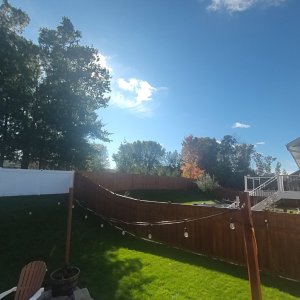
One more demonstration of this new and improved Passthrough. The following were taken with the headset on my head, both the still image and the video. And it is pretty stunning.

If you have been enjoying the Quest 2 over the past three years and want to continue the experience of the best Mobile VR on the consumer market right now, then upgrading to Quest 3 is a good choice. I have been working in the VR space for almost 8 years, and I rarely experience the rush of the original days when I first strapped on the Gear VR and the HTC Vive, but I can honestly say that the Quest 3 blew my mind. Especially the Mixed Reality Demo that features aliens blasting through your walls and bouncing off your furniture, as you blast them with your ray guns. The experience reminded me of an old demo with the Magic Leap One, but since the passthrough is all video, the experience is seamless in both direct and peripheral vision (AR headsets are famous for their tiny field of view).

At the same time, the Quest 2 will continue to be a very good entry level headset. The vast majority of games will be backwards compatible, at least for a while. So if you aren’t in a rush to drop half a grand on a new headset, you aren’t being left behind. The move from Quest 1 to Quest 2 felt more like “to experience good VR you need to make the change”. The shift to Quest 3, while I’d say it is a more dramatic change this time around, it is at the same time a more tolerable shift, because the Quest 2 remains a very good VR headset, and will be a solid choice for a while into the future.

It’s worth noting that battery life continues to be an issue and there is some concern that by trying to keep things small while increasing the computing power we could see battery life drop. I will be paying attention to that as I use it. Also the stock headstrap, while I’d argue is modestly better than the Quest 2 stock strap, if you’re a regular user you will want to upgrade to an Elite style strap (and wait a month or so for the 3rd party companies, like Kiwi, to release solid solutions).

The Quest 3 is the VR headset the market has been waiting for these past 3 years. The Quest 2 served us well, and will serve as a solid workhorse for years to come, but the landscape of Virtual Reality is changing. The introduction of more Mixed Reality solutions and “Spatial Computing” concepts mean that Meta has to continue to push innovation or be left behind when companies like Apple make their play for the market.

The Quest 3 is an upgrade you feel every time you use it. It’s more like moving from PS3 to PS5, versus iPhone 13 to 15 (both jumps I’ve made myself recently). If you love VR this is a headset to get. Or you can hope you know someone who has one and ask them for a demo. I can pretty much guarantee you’ll have a blast.

More to come on the details as I use this headset over the next few weeks.

Cheers!
BC

My VR Office Experiment: Day 2

Day 2 in the Virtual Office

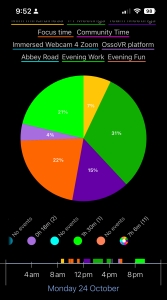
Total Time in VR: 4 hours and 54 minutes.

Primary Use Cases: Focus Time, Team Meetings, 1:1 Meetings, Mini-Mindfulness

Another day in the VR Office! I’m surprised how many hours I’m clocking right now. My goal was 2-3 hours a day this first week, but I find it so easy to just stay in here and keep working that I’m adding lots of hours.

I want to touch quickly on how I am tracking my time in VR. I have an app installed on my iPhone that allows me to “check in” and “check out” of VR based on what I’m doing. This allows me to easily see what types of use cases are being used the most and the least, without having to track it in a notebook! Each day I will post the pie chart showing my overall usage.

Cup Half Empty: I had my first issue with headaches today. Following my first 2 hours in headset (admittedly that’s a LONG session), I had a Zoom call that found me looking at a bare lightbulb over my laptop, which triggered the headache. Perhaps the 2 hours of VR contributed. It’s to soon to tell, as I did similar extended periods yesterday without issue. But it took an hour to calm the headache down and I was back at it, without issue the rest of the day.

I also tried to use the Immersed application to join a Zoom this morning as an avatar, but the Immersed VR Camera was no longer in my video options in Zoom. So I ditched it and did Zoom in the usual manner (good ole webcam). This tech needs to work EVERY TIME, and that was a fail today. I am checking the setting this evening so hopefully it will work in the future.

Cup Half Full: Today I started my day like most of my days on the minigolf course doing 10 minutes of silent meditations with a couple of co-workers, that we call “Mini-Mindfulness”. We have been starting our day that way for nearly 5 months and it is amazing to have such a consistent start as a remote worker. If only we could share some coffee together!

I also attended a couple of Zoom calls (off camera) from my Personal Office in Workrooms and it was so awesome to watch on the bigger screens in a virtual space (I am a beach room fan as you can see in my pic at the top of today’s post). I hope to have other co-workers join me for those calls in the future, giving us the ability to “go to the conference room” together, as we do for many of our regular meetings. Anything that takes the sting out of Zoom is good in my book!

#TLDR

Day 2 saw the first pinch of eye strain for a moment this morning, but then I bounced back to a another full day of VR. I spent a lot of time alone working on projects. I jumped into a couple impromtu meetings with co-workers in other VR spaces, making the joke “let me just dash down the virtual hall” one too many times! I will keep paying attention to eye strain and headaches, and perhaps build more down time into the schedule. I’m not here to prove 40 hour workweeks in VR are a good idea after all!

Till Tomorrow…

BC (with updated avatar!!)

My VR Office Experiment Day 1

Day 1 in the Virtual Office!! Let’s begin!

This is my first entry as I chronicle my experience using Virtual Reality for Productivity. I have been a VR enthusiast for many years. My first VR headset was the Samsung Gear VR for Galaxy S6. I even reviewed it on an old blog! Since those early years of experimentation I have gone on to work with VR in a professional setting for the past 6 years. I’ve used the majority of available hardware, and I have dreamed of a day when I could replace my laptop with a VR Office. We are not there yet… But we are getting closer!

I monitor the newsfeed for news around VR for Productivity. Most studies I’ve read are either fans who don’t see the down side in VR, or critics who fail to see any upside. I’ve been waiting for a long-term user of VR to grab some tools, and really use the technology in a structured and focused manner. The end result being a report card of sorts detailing what is good, and what is bad. What use cases are solid, and which are laughable. I’m tired of waiting. So I’m just going to do it myself.

I have the advantage of working for an awesome VR company, OssoVR. The company builds surgical training modules using virtual reality, and is 100% remote. I was issued two Meta Quest2 headsets when I joined (in addition to the two I already owned). In addition to my regular job, I have had the chance to spend the past year exploring the Horizon Workrooms platform (since the day it released in beta), along with a slew of other services. If you can name it, I’ve probably used it at some point in the past 4 years. I average 15 hours a week in VR, but some of that is for fun.

Walkabout Minigolf is highly recommended if you are new to collaborative VR and want to have a great time with friends. I am going to attempt 50% of my time in VR for at least 4 weeks. Might push it to 8 weeks, but we’ll just take it one day at a time. Each day I will post how I used VR for productivity that day, and highlight some highs and lows. Hopefully in the end I can lay out a report around how this technology might move forward and how the “metaverse (ugh)” might be built in a scalable, and sustainable way. We will see…

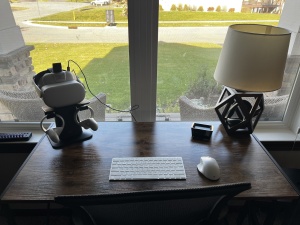
I have set up a “VR Office” for this experiment. Pictured here. I have a pop-up desk that I can move around that house, based on where I want to work (I intend to use passthrough along with virtual offices). I have a KIWI stand for my headset when not in use, and all the power needed to keep things charged. I have a modified faceplate with built in fan. It’s very quiet, but with a 3 hour battery life, I’ll need to charge between sessions. I also have prescription lenses for my Quest, but I usually just use contacts. I use an Elite Headstrap with additional battery. This gives me twice the battery life and helps balance the weight in the front and the back. I am using both Magic Keyboard and Logitech MX Keys for keyboards, and a Microsoft Mouse that can toggle between Mac and PC (I will be moving between two remote laptops located in my physical office). For software, I am using Meta Horizon Workrooms for my primary office. I am also using Immersed, which features a VR webcam that allows me to join Zoom calls as my Meta Avatar. Those are my primary Productivity tools to start. For social time with my team, I use Walkabout Minigolf (already mentioned) and ForeVR Cornhole at the moment. That’s my config. Here’s how Day 1 went:

Day 1 in the Virtual Office

Total Time in VR: 7 hours and 6 minutes.

Primary Use cases: Morning Meditation, Weekly Project Meeting, Multiple 1:1 meetings, Focus time, Customer Meeting, Evening Work

I spent more time today than I even planned. I was surprised how much the fan helped to keep my face cool throughout the day. I spent most of the day in Horizon Workrooms collaborating with others. I did spend a couple hours in my Personal Office as well, working on my own projects.

Cup Half Empty: I had some WIFI issues with others causing latency drops in Workrooms. My MX Keyboard is struggling to map in full VR mode, so I’m using desktop passthrough. Even the Magic Keyboard was a little “floaty” today. I believe this is tied to the mapping of the desk surface. Multiple attempts, and I can tell the desk is too high (meaning the keyboard is “under the desk”), but I haven’t been able to resolve.

Cup Half Full: My Macbook went to sleep upstairs, but I was still able to login from the VR Office without having to go wake it up. That was unexpected. The clarity of the screens in the Personal Office is great. Much easier to work on than the earlier version of Workrooms, and better than Immersed (another VR Office I will be using mostly for the webcam).

#TLDR: Today was a good start. Lots of time in the headset with ZERO eye strain or neck strain. I met with many other avatars and explored the new Breakout Rooms of Workrooms. Very happy with the experiment so far, but making sure I don’t put my foot on the “virtual scale”. This experience might still suck, and I will let the facts speak for themselves.

Till Tomorrow…

BC