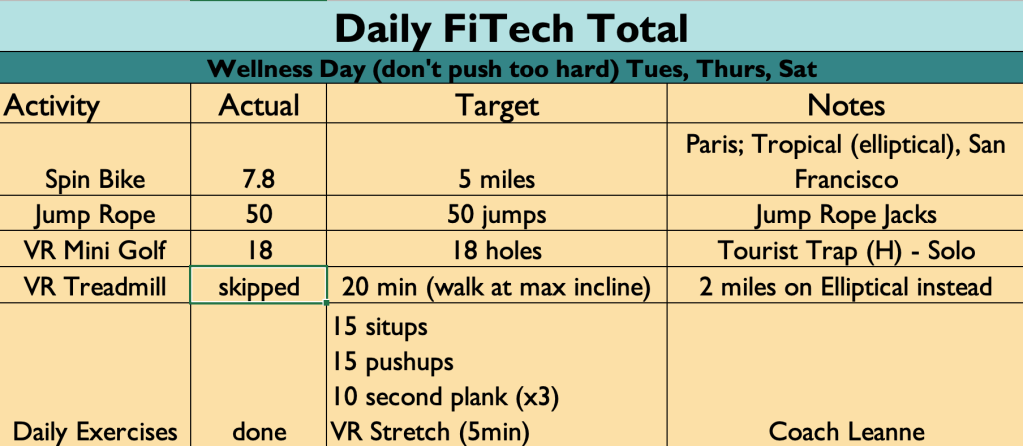
Today was a wellness day (aka rest day, kinda). I added the cadence tracker to the Elliptical and it worked great! But 2 miles of Elliptical is NOT the same as 2 miles on the spin bike. I was running (pun intended) very hot!! So skipped my 20 minute walk on the treadmill today. I will have to ponder how to integrate the Elliptical into the routine in the future. But I prefer the Spin Bike for certain.
Otherwise a pretty normal Wellness Day. Tried out “Jump Rope Jacks” with the weighted CrossRope tonight. Did it with double jumping, so two jumps for every rotation. Takes some coordination, that somehow I managed to demonstrate in the cold garage!
That’s it for today. Back to Fitness tomorrow and a nice long bike ride.
For the purpose of simplicity, I am only counting weekdays for the FiTech count. So it will be 40 days total.
I had a rough weekend with eating too many jelly beans (tis the season). Went up a pound on the scale today, so that wasn’t a great start. But I didn’t overdo it today either. My old method would be to push super hard to make up for my “mistake”, but I dodged that bullet, and didn’t throw my back out. So we’ll call that a victory, no matter what the scale says. Wellness day tomorrow.
Welcome to our next experiment with virtual and mixed reality!! In the Fall of 2022 we did a two month experiment for “VR for Productivity” using exclusively Virtual Reality to see if such spaces could be useful in the workplace. The results were very positive, though never published publicly. Part of the reason for the lack of follow through with that first experiment was my own health. I have struggled for the past 1.5 years with various issues, and I’m finally at a point where I can begin to regain lost strength and get to a much healthier place. This task before me is daunting and I hate working out. But I also have a bunch of fitness tools in my house, so I thought it was a perfect time to do another experiment.
Combining “Fitness and Technology” gives us “FiTech”!! This one will truly be “mixed reality”, using the powerful full-color passthrough of the Meta Quest 3 in many instances. I am also pairing things like cadence trackers to my spin bike and elliptical to create synched VR experiences. So far it’s been going great!!
As I did with the VR for Productivity experiment, I will list the tools I am using. In the coming weeks I will include reviews of these tools, as I use them more often. These include hardware and software.
My home gym consists of a treadmill, elliptical, and spin bike. I have equipped both the elliptical and bike with a cadence tracker that allows me to link my physical movements with movement in virtual reality. I also have a CrossRope, which I use for jumping rope 5 days a week. I use a quarter pound rope at the moment, but also have a half pound rope option that I might switch to at some point. I also use a HydrateSpark smart water bottle to track water consumption, a Withings Scale and Blood Pressure cuff, and I use an Oura Ring for the majority of my metrics tracking. In addition to hardware I am using three pieces of software for VR Fitness. I use Supernatural VR for cardio boxing, Holodia Holofit for Cadence tracker Spin Bike and Elliptical, and Meta Browser to watch YouTube while walking on the treadmill. Finally I use the software NOOM for tracking calories and tying all my health metrics together. I might add more software during the experiment if it makes sense, but this is where things begin. (I also use a Quest 3 for VR exclusively)
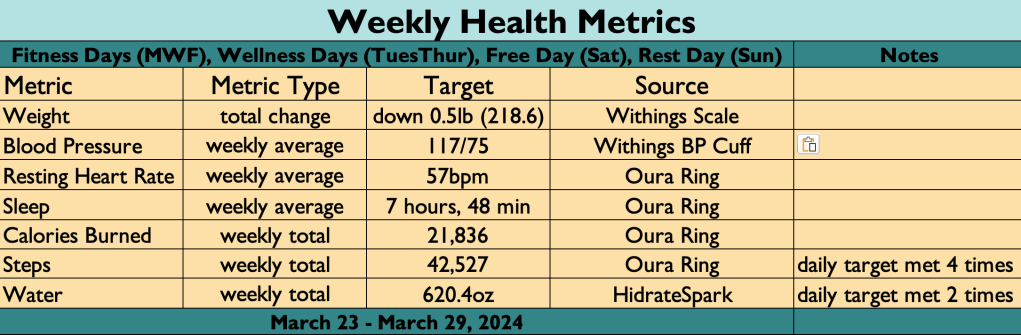
Each week I will post my weekly summary of all activities and some health metrics to help show how these activities are impacting my overall health. Hopefully these numbers trend in a positive direction, but only time will tell.
I will modify these posts as it makes sense. This is just where we begin. These are changes I must make and I am happy to share this journey publicly, in hopes that my story might inspire others to take their health seriously, and to realize that Mixed Reality and Virtual Reality could serve as powerful tools for Fitness. Here we go!
Starting Point. I began the NOOM program 5 week ago, and only began introducing exercise this past week. I started out at 236 pounds (which makes me obese…). I also have a history of high blood pressure, averaging 136/95 with medication. My numbers have seen dramatic improvement since beginning the NOOM program. I start this phase of the experiment at 219 pounds, with an average blood pressure within a healthy range!! But there’s more work to do, as my weight goal for weight loss is 50 pounds!
Technically this is Day 7 of Week 1, I just only started tracking things formally on Monday. Over the weekend I will put together my full 7 day week totals and share both my exercise totals and my health metrics (things like BP, weight change, resting heart rate, etc).
It was a good first week of tracking. Seven weeks to go with this experiment of VR for Fitness!!
Today was a rough work day, and so I took a few extra laps around Venice on the Spin Bike to work out some feelings. Wrapped the evening playing a round of the Land of the Elves with my wife, which was relaxing. Almost done with this week. One day to go! A Fitness Day!!
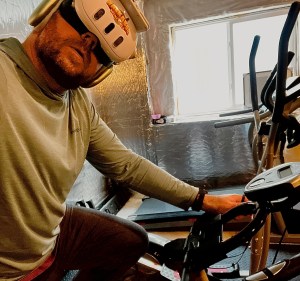
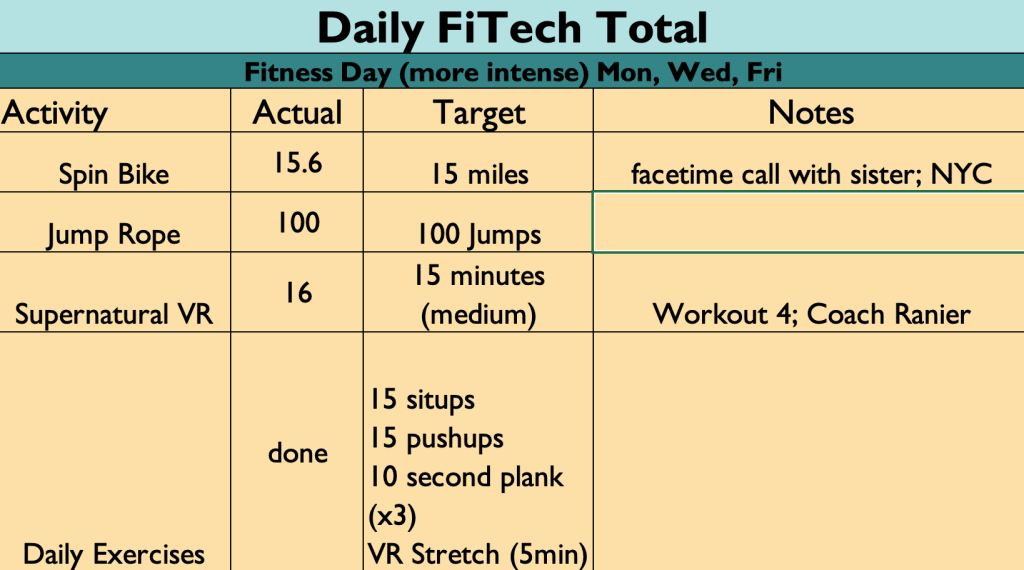
I didn’t manage to get on the bike in the morning today, so I had to do all 15 miles after work, which was a lot. I broke up the VR into three different worlds though, so I didn’t get bored doing that same loops over and over again. And kept that techno blasting through my Airpod Maxes (strapped over the top of my VR headset). A good fitness day.
Ahead of my first weekly summary (coming April 1st), I am trying out just tracking my daily progress in the post feed. Gives me some personal accountability (regardless if anyone actually sees it).
Ahead of my first weekly summary (coming April 1st), I am trying out just tracking my daily progress in the post feed. Gives me some personal accountability (regardless if anyone actually sees it).
The Quest 3 has finally arrived! The latest virtual reality headset from Meta has some seriously high expectations, both as a “next generation” device, and for helping Meta compete in the area of Mixed Reality, just as Apple is set to ramp up interest in the space with the Vision Pro early in 2024. So let’s looks quickly at this new VR headset and answer some basic questions with my first impressions.
For those new to my style of reviews, these are not technical reviews, but more consumer reviews. I want anyone who is interested in virtual reality to know what this new headset is, and whether it’s worth dropping $500 to get (versus, you know, getting a PS5 or something). Here we go!
The previous headset, the Quest 2, lived a very long life for an emerging technology at THREE YEARS. For context the original Quest launched in 2019 and lasted one year before the Quest 2 replaced it in October 2020. So the market is now full of Quest 2 hardware, which Meta will continue to sell as an “entry level” device starting at $299. So what do you get for the extra $200? Many things it turns out. But we’ll keep this pretty high level.
New Form Factor – the Quest 3 is a significant change from Quest 2. There is a claimed 40% reduction in size. Simply put, this thing feels way more like ski googles than the Quest 2 ever did. While it weighs roughly the same as the previous generation, the Quest 3 doesn’t feel as heavy because the weight is closer to your head. The lens are changed out for “pancake” style, which means they are thinner, and also they are larger, so you will have an increased field of view when you are in VR. The controllers changed too, ditching the rings that often caused confusion for new users (but did give us a handy way to “hang up” the controllers when not in use.) No more rings. The controllers are still tracked by the headset though, so no putting your arms behind your back (like you can with Quest Pro, which features self tracking controllers). So, big change in the physical headset that is VERY noticable visually and also when you wear it.
Software Updates – the headset is run by a much faster computer chip, which means games launch faster, and the headset can support higher quality graphics. Many game makers are already upgrading the graphics of their content libraries (including my fav, Walkabout Minigolf). The user interface is the same as Quest 2, so there isn’t a whole new ecosystem to learn thankfully.
Color Passthrough – I’m giving this topic it’s own section because for many it will be a huge selling point. And for Meta to compete in the Mixed Reality space, this feature needs to hit with consumers. On Quest 2 the passthrough camera revealed a grainy grey world when enabled. The passthrough wasn’t even intended to be functional beyond setting your “guardian space” when the Quest 1 originally launched. But as more folks want to play Mixed Reality games, or build experiences that overlay the physical space with digital experiences, the passthrough became more important to the product development team. The Quest Pro features the first “full color passthrough” but it was still pretty grainy, and without a depth sensor it was still just taking flat videos of your space, and wasn’t great at mapping physical objects (which is crucial for mixed reality).
Notice these pics taken with Quest Pro (left) and Quest 3 (right). The first looks out my office window. The Quest Pro is a blown out light space and requires moving closer to the window to see building and objects. The Quest 3 is clear immediately. The second set of photos is my office desk. You’ll notice the Quest Pro (left) is more washed out and blurry, whereas the Quest 3 (right) has that pop of color. What you can’t see in the picture is that I can read the words on the world map on my desk with Quest 3, where with Quest Pro it’s all white blobs. So the passthrough upgrade is a true game changer for the Quest product line. I look forward to seeing what developers do with it. I’m already using it for Horizon Workrooms and Puzzling Places, and the upgrade is very noticeable.
One more demonstration of this new and improved Passthrough. The following were taken with the headset on my head, both the still image and the video. And it is pretty stunning.
If you have been enjoying the Quest 2 over the past three years and want to continue the experience of the best Mobile VR on the consumer market right now, then upgrading to Quest 3 is a good choice. I have been working in the VR space for almost 8 years, and I rarely experience the rush of the original days when I first strapped on the Gear VR and the HTC Vive, but I can honestly say that the Quest 3 blew my mind. Especially the Mixed Reality Demo that features aliens blasting through your walls and bouncing off your furniture, as you blast them with your ray guns. The experience reminded me of an old demo with the Magic Leap One, but since the passthrough is all video, the experience is seamless in both direct and peripheral vision (AR headsets are famous for their tiny field of view).
At the same time, the Quest 2 will continue to be a very good entry level headset. The vast majority of games will be backwards compatible, at least for a while. So if you aren’t in a rush to drop half a grand on a new headset, you aren’t being left behind. The move from Quest 1 to Quest 2 felt more like “to experience good VR you need to make the change”. The shift to Quest 3, while I’d say it is a more dramatic change this time around, it is at the same time a more tolerable shift, because the Quest 2 remains a very good VR headset, and will be a solid choice for a while into the future.
It’s worth noting that battery life continues to be an issue and there is some concern that by trying to keep things small while increasing the computing power we could see battery life drop. I will be paying attention to that as I use it. Also the stock headstrap, while I’d argue is modestly better than the Quest 2 stock strap, if you’re a regular user you will want to upgrade to an Elite style strap (and wait a month or so for the 3rd party companies, like Kiwi, to release solid solutions).
The Quest 3 is the VR headset the market has been waiting for these past 3 years. The Quest 2 served us well, and will serve as a solid workhorse for years to come, but the landscape of Virtual Reality is changing. The introduction of more Mixed Reality solutions and “Spatial Computing” concepts mean that Meta has to continue to push innovation or be left behind when companies like Apple make their play for the market.
The Quest 3 is an upgrade you feel every time you use it. It’s more like moving from PS3 to PS5, versus iPhone 13 to 15 (both jumps I’ve made myself recently). If you love VR this is a headset to get. Or you can hope you know someone who has one and ask them for a demo. I can pretty much guarantee you’ll have a blast.
More to come on the details as I use this headset over the next few weeks.
Happy New Year from the physical side of the VR Office!
Final Day in the Virtual Office!
Today marks the end of the VR Office Experiment. Well, at least the end of the period of data gathering. I have been sharing daily stats for the past 40 working days (plus some additional weekend content). Those stats are just the basic numbers. There is more data to be mined out of the tools I have been using to track my productivity in VR. But not till next year. For today I will wrap up with the final Week Stats, and share one last chart as a teaser to the next phase.
For me, this a huge day. Writing posts almost every day for two months was daunting at times. But I made it through without a miss, and made some fun videos along the way! So I am very happy to cross this milestone from data gathering to data analysis. And I’m glad to be done with daily posts for at least a few weeks, as I take some time off for the holidays.
Here are the stats for Week 8 in the VR Office:
Total Time in VR: 11 hours and 30 minutes (across 22 sessions)
Team Meetings: 5% – 32 minutes (across 3 sessions)
Summing it all up (too long for #TLDR)
I saw a dip in the number this final week mainly due to this being a short week with lots of Zoom calls to wrap up the year. But like I’ve said so many times over the past month, that is OKAY. The number are what they are.
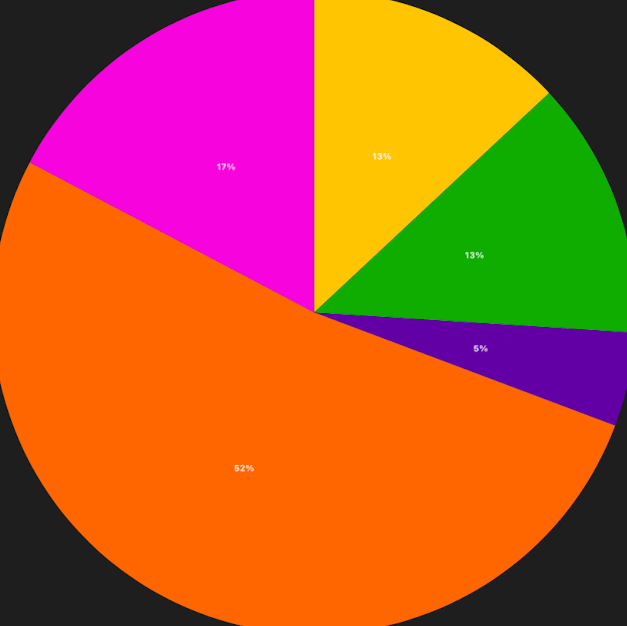
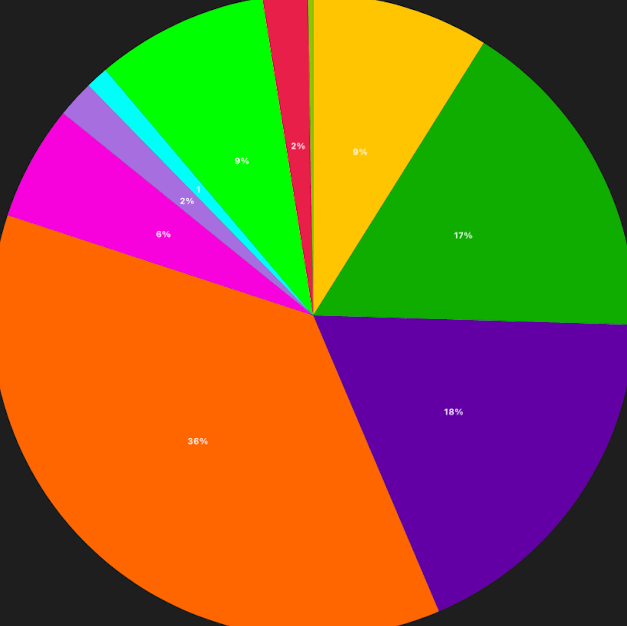
I started this effort as a personal exercise, because I wasn’t finding enough data from people who didn’t enter the VR Office with a bias (both for and against it). My work tracking my usage in VR quickly turned into something that had value for my company, OssoVR. As a remote company, these VR Office tools could be very valuable. But they could also be a distraction, and a waste of time and money. We need to understand how these tools work in order to know where they add value. I’ve done my best to to honest all along the way. I chose to share the journey online through this blog and LinkedIn posts, and the response has been pretty cool. Over 400 people have followed these posts across 20 countries! Thank you to everyone who has chosen to read these daily journal entries. I’ll be back in January 2023 to share more about my findings. My end game is a detailed report articulating “The Value of VR for Workplace Productivity“. But more on that to come. I’ll leave you with a final pie chart. This represents my 40 day VR Office Experiment. I’ll talk numbers in January, but just know that I spent over half of my working hours in VR during this experiment, and Focus Work, Team Meetings, and 1:1 Meetings were the biggest slices. And that gives us a clear path forward.









 Carrier Pigeon XR